
In our decade more than any other, content creators, gamers, and internet professionals across the web spend a ridiculous amount of time embracing their passions and creating a lifestyle around what they love. If your a content creator, a business professional, or someone who loves to grind on games, you’ll need a capable device.
For whatever reason you need to build you first setup , this article will guide you through the basics of building a computer, while also informing you of the hazards you could face when working with some of this hardware.
Budget
There are many things to consider when building the foundation to your setup. For starters, think about your budget; How much are you willing to spend on your setup? Most would agree that low end costs for a decent build can be about $400.00 USD, if your diligent in searching for parts. But this price can go even beyond a couple grand.
Parts
Once you’ve calculated your budget, it’s time to think about the parts. A computer, of course, is a machine containing a variety of parts that help it ‘compute’ or problem solve through input, output, and complex mathematics.
Here are all the core parts necessary:
- Case/Tower
- Core Processing Unit(CPU)
- Graphics Processing Unit(GPU)
- Motherboard
- RAM
- SSD
- HDD
- Cooling Fans
- Power Supply
- Wires
The term ‘wires’ is left vague because most of the time, when buying a brand new part, especially from a trusted company and provider, you’ll find cables or wires for that corresponding part within the packaging. Make sure that when researching these parts, you find components that are meant to fit together, and that are compatible. For example, all motherboards have a corresponding socket for the CPU. Some take Intel CPUs, while others only take AMD CPUs.
Note that there are many extra devices you can get for your computer, such as water cooling and even small displays. This list however, just shows the basics for what you need, some will even say a hard disk drive isn’t even required to boot the computer, however you’ll most likely need it.
Safety/Hazards
Building a computer is simple, and actually pretty fun when you get the hang of it. Though you are working with tools, hardware, and electricity, you want to make sure that anything bad that can happen, won’t happen.
Electricity and Grounding
When working with computer hardware, and most other electronics, it’s actually possible to build up static electricity through the process. This can be very dangerous for both you, and the device. You can be at risk of this because of the possibility of static shock if you’re not careful. For your computer, if there’s built up static within the parts the first time the device is booted, it could damage the PC.
The point is to diffuse the static electricity, or ground it. Grounding is electricity’s nature of traveling back to the ground.
Tips to prevent the build-up of static, and for using ‘Grounding’
- Avoid wearing socks and baggy clothes that quickly build up static electricity.
- Choose to have your workspace on a non-conductive floor, like concrete or wood.
- Use an anti-static wristband, and an ESD mat.
- Rubber gloves WILL NOT discharge static electricity!
Protective Equipment
While rubber gloves wont discharge static, other types of personal protective equipment is still a good idea, especially when working with tools and hardware. Always put on eyewear before working, especially because from time to time, you’ll be getting your face close to your hardware. Your work area is also part of your work equipment, your workbench should be clear of any hazards. Make sure that if possible, you wont knock anything over or trip easily if you turn around without thinking. Proper lighting ensures that you can see what you’re doing and where your hands are. Headlamps are a great way to keep a light where you need it, without struggling with standing it up somewhere that’s going to be in your way, or holding it. High end headlamps have features like rechargeable batteries and magnets for hassle free mounting.
Manuals
Reading installation manuals as they come with the parts you buy, is an essential habit to knowing how to build a PC. Manuals are essential, because every part has their corresponding ports, connectors, and special features. Knowing this will make building your PC and fitting your parts much easier.
Tools
There aren’t a ton of tools you actually need to build a PC. A versatile driver set and some thermal paste would do, but there are other tools that make the job way easier.
Helpful Tools:
- Screwdriver set
- Thermal Paste
- Canned Air
- Zip Ties
- Pliers/Vice Grip
- Headlamp
- Screw Organizer
Step-by-Step
Every PC builder does it a little different, but over time there’s been a general pattern, and easy shortcuts to make building a PC simple and fun. I recommend watching a hands-on demonstration to familiarize yourself with the parts you’ll be using.
Walkthrough
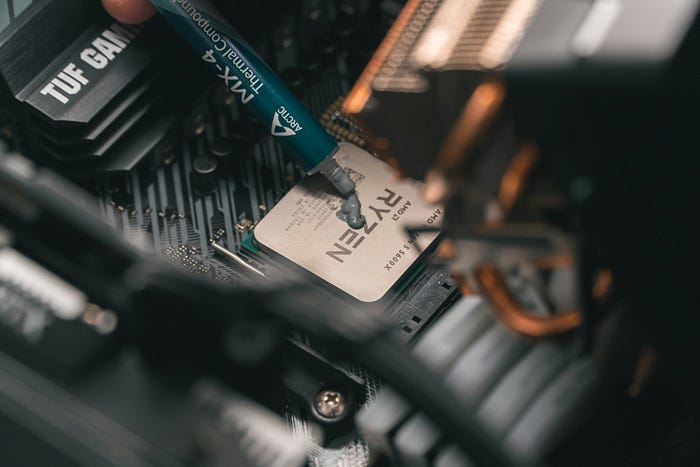
Step 1) Unbox your motherboard, install your CPU and thermal paste.
Step 2) Unbox, then install your graphics card(GPU) and CPU cooling to the motherboard.
Step 3) Install your RAM and SSD onto the motherboard and set aside.
Step 4) Install case fans.
Step 5) Attach the power supply to the case.
Step 6) Attach the HDD onto the case.
Step 7) Install the motherboard into the case tower, and attach all the cables from previous parts to the motherboard(if applicable).
Step 8) Boot it up!
Once your PC boots to bios, you’ll know you’re in business. From here it’s just software and optimization.
What’s left:
- Install an Operating System, if applicable.
- Update drivers and software
- Optimize performance, and if you want to, overclock your build.

Conclusion
For many tasks nowadays, a strong computer is required and knowing what you’re doing can make a world of difference, and also gives you room to upgrade down the line. As long as you have the right parts, and knowledge to put them together, putting together a PC can become more fun of a task one would think, and the reward is great. Research your parts, read your manuals and go through the steps, then sit back and admire your first computer!

Leave a comment